Installing sc
sc is the deploy agent: you run it in your project directory, it reads your
compose file, packs every build: context into a tarball and uploads the lot to
the platform. It is one static binary — no runtime to install beside it, no
Docker daemon, and nothing that has to be on your PATH for it to work.
Everything below is on /install, which needs no account: you can get the CLI before you have somewhere to point it.
The one-liner (macOS and Linux)
curl -fsSL https://someones.computer/install.sh | sh
That script:
- works out your OS and architecture from
uname, - downloads the matching archive from someones.computer,
- checks it against the SHA-256 published alongside it, and refuses to go on if they differ,
- installs it to
/usr/local/bin— or~/.local/binwhen that needs root.
It never runs sudo. If /usr/local/bin isn't yours to write to you get a
per-user install and a line telling you how to put it on your PATH. Set
SC_INSTALL_DIR to choose somewhere else outright:
curl -fsSL https://someones.computer/install.sh | SC_INSTALL_DIR=~/bin sh
It is an ordinary shell script and it is worth reading before you pipe anything into a shell — open https://someones.computer/install.sh in a browser.
Or take the archive
The page lists every build with its size and checksum, marks the one matching the browser you are reading it in, and links each to a download served by the platform itself.
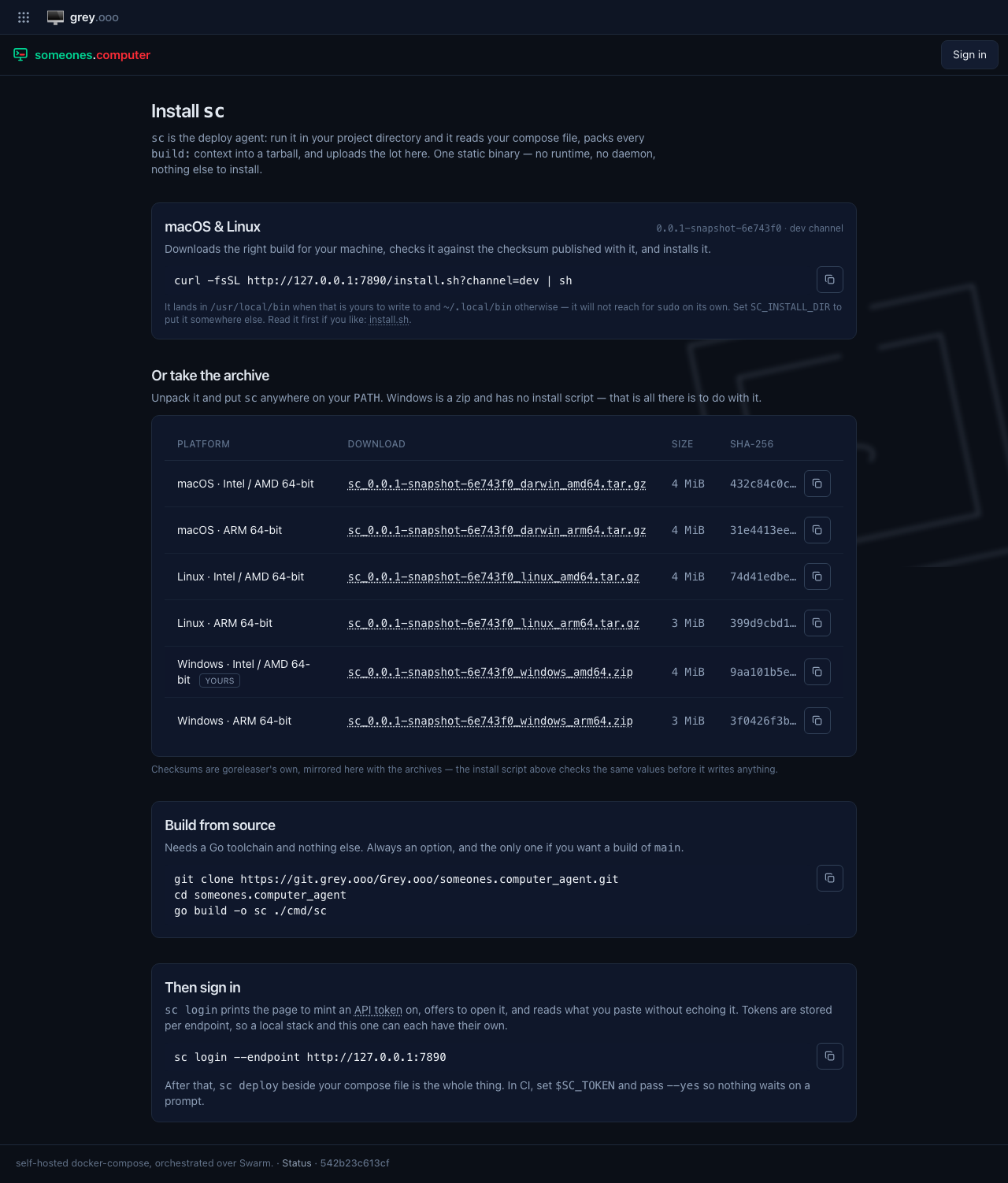
(The row marked "yours" follows whatever browser is asking — the screenshot was taken by a Windows one.)
Unpack it and put sc anywhere on your PATH:
tar -xzf sc_*_linux_amd64.tar.gz
install -m 0755 sc ~/.local/bin/sc
Windows is a .zip and has no install script — unpack it and put sc.exe
somewhere on your PATH; that is the whole procedure.
Channels
| Channel | What it is | How to get it |
|---|---|---|
| stable | the latest tagged release | the default, everywhere |
| dev | built from the CLI's main on every push |
add ?channel=dev |
curl -fsSL 'https://someones.computer/install.sh?channel=dev' | sh
While the CLI is pre-1.0 there may be no stable release yet, in which case the
page and the script fall back to dev — and say so. Whatever you are being
offered, the channel and the exact version are printed on the page and by the
installer.
Building it yourself
Always an option, and the only way to run an unreleased commit. It needs a Go toolchain and nothing else:
git clone https://git.grey.ooo/Grey.ooo/someones.computer_agent.git
cd someones.computer_agent
go build -o sc ./cmd/sc
Then sign in
Mint an API token and hand it to sc login:
sc login
It prints the page to create a token on, offers to open it, and reads what you
paste without echoing it. Tokens are stored per endpoint in
~/.config/sc/credentials.json, so a local stack and the hosted platform can
each have their own. In CI, set $SC_TOKEN instead and pass --yes so nothing
waits on a prompt.
Anywhere but the hosted platform, sc login/sc deploy need to be told which
endpoint to talk to. Prefer --staging over spelling out --endpoint https://staging.someones.computer — it is sc's own shorthand for the same
thing, and /install prints it that way when the page itself is served from
staging. --endpoint <url> is still what you reach for against a local stack
or any other host.
From there, sc deploy beside your compose file is the whole thing — see
applications.